Upgrading from Lite (Free)
Welcome to JPS4+ Lite! The Main Docs will have almost all the same functionality: the only real difference is that the algorithms here will be running synchronous, so jobs / multithreading / burst will not be used like in the Pro Version. I highly recommend you upgrade if you're going to build anything beyond a hobby project.
Reach out with any questions at silointeractivegames+jps4@gmail.com
Asset Store Links:
JPS4+ Lite vs. JPS4+ Full
JPS4+ Lite 2D Grid Pathfinding is the free version of the asset. It contains single-threaded implementations of every algorithm and is a great way to evaluate JPS4 before committing to the full version.
JPS4+ 2D Grid Pathfinding (full version) provides multithreaded, highly optimized, and Burst-compatible versions of each algorithm available in the Lite version, along with additional features:
| Feature | Lite (Free) | Full |
|---|---|---|
| A* 4-connected | ||
| A* 8-connected | ||
| JPS4 Horizontal-First | ||
| JPS4 Vertical-First | ||
| Burst-compiled algorithms | ||
| Multithreaded job queue | ||
| Highly optimized native containers | ||
| Dynamic obstacles | ||
| Closest target support | ||
| Animated grid movement |
Steps to Upgrade
-
Back up your project - commit or snapshot your project before making changes.
-
Remove the Lite package - in the Unity Editor, delete the
JPS4Pathfinding2D-Litefolder from yourAssets/directory. -
Import the full package - import JPS4+ 2D Grid Pathfinding from the Unity Package Manager (Window → Package Manager → My Assets).
-
Resolve any namespace changes - the full version uses the same public API surface as Lite. If you have custom scripts referencing JPS4 types, they should compile without changes. Verify there are no remaining compiler errors after import.
-
Re-build your grids - open each scene that uses a
PathfindingGridBuilderand press Build on the component to ensure collision data is refreshed against the new assemblies.
Performance
Once upgraded, enable Burst compilation in your project (Jobs → Burst → Enable Compilation) to get the full performance benefit of the multithreaded job queue.
Safer (in-place) Upgrade
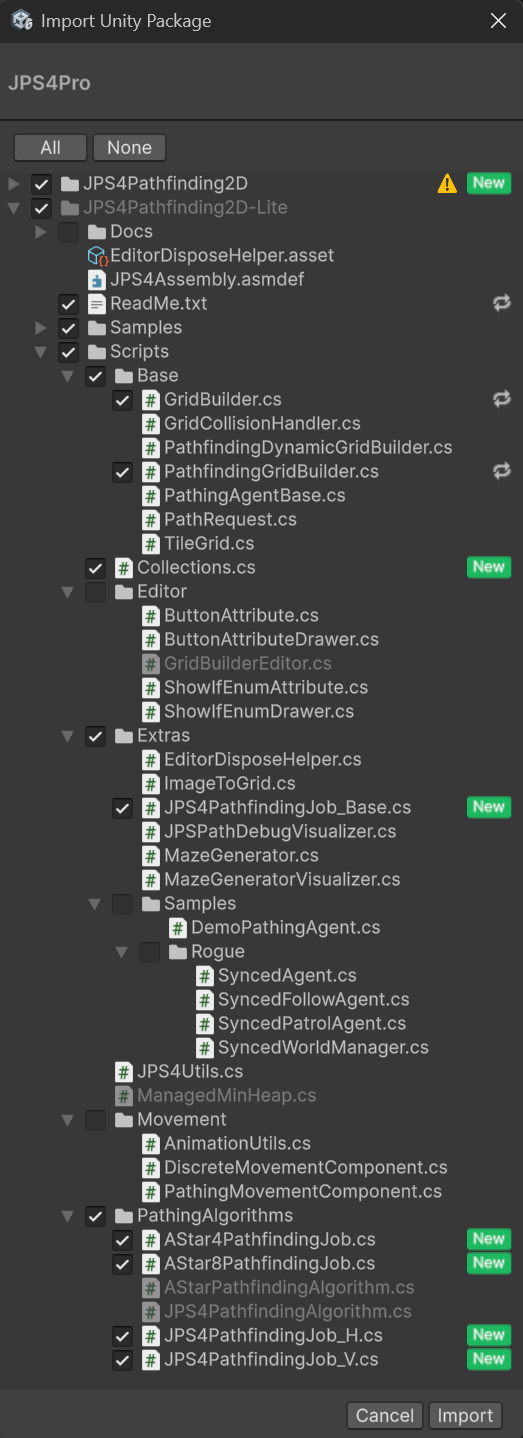
If you've already been using the lite version for a while, and want to just upgrade the necessary scripts, you can can still just drag in or import the pro version and do a few extra steps to replace the lite version.
- Import the Pro package - Check everything here, it will overwrite the existing scripts where needed.
- Remove Editor warnings - Delete the file at
Assets/JPS4Pathfinding2D-Lite/Scripts/Editor/GridBuilderEditor.cs - Move tests into JPS4-Lite - Move the folders in
Assets/JPS4Pathfinding2DintoAssets\JPS4Pathfinding2D-LiteThis is needed because of the assembly reference - Restart Unity this will refresh all the editors etc.
- Rename You can now remove the
Assets/JPS4Pathfinding2Dfolder, and rename theAssets\JPS4Pathfinding2D-LitetoJPS4Pathfinding2Dfor future upgrades.